Devlog #3: the level select was a spreadsheet, so I turned it into a journey
Hey, welcome back to another PolyTowerz devlog.
This week wasn’t about a new tower or a flashy gameplay feature. It was about something players only look at for a few seconds: the level select.
The original version worked. It shipped. Nobody complained.
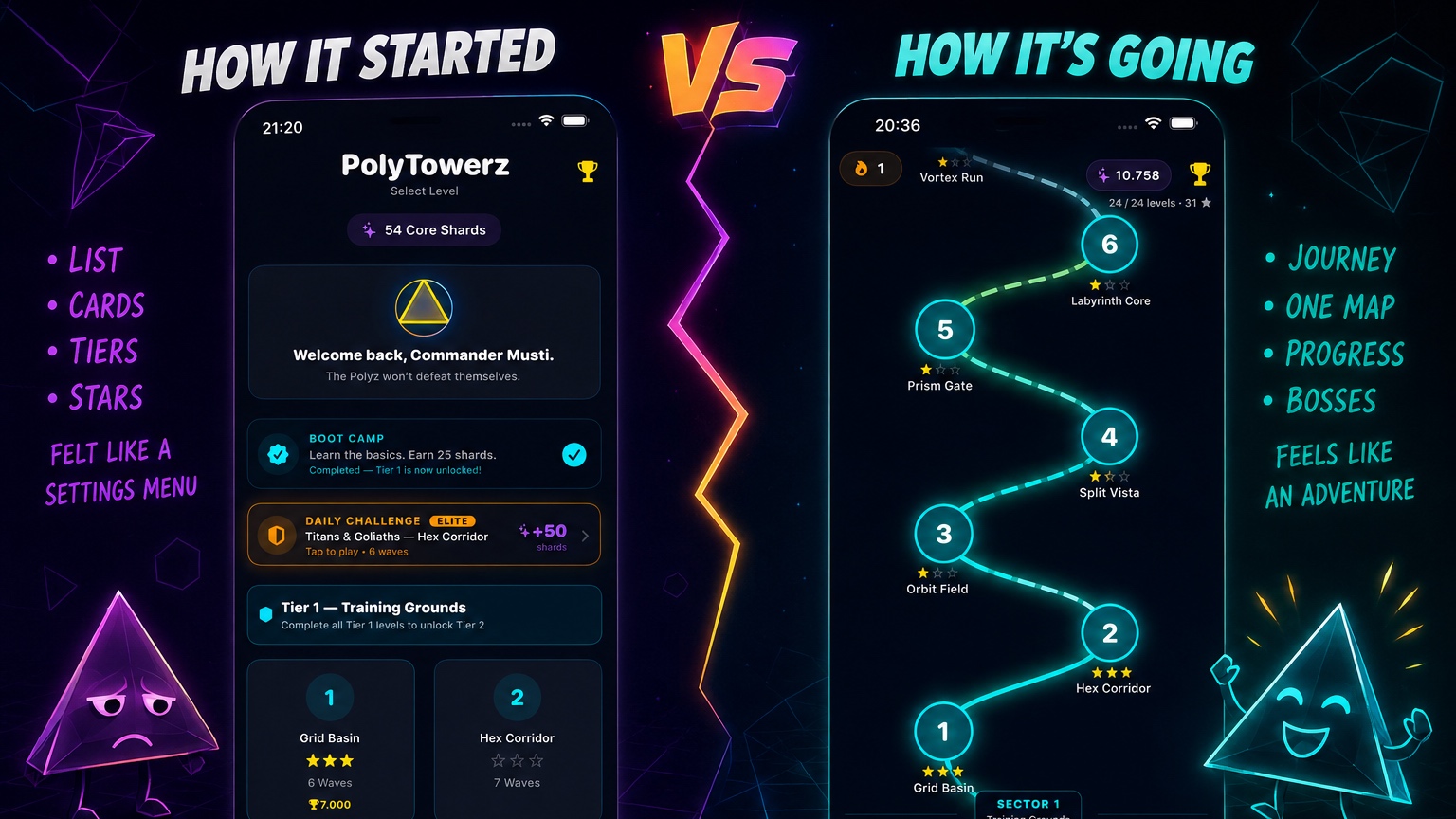
It was a collection of cards showing level numbers, stars and tiers. Perfectly functional, but every time I opened it, it felt like browsing a settings menu instead of preparing for an adventure.
I wanted the campaign itself to feel like a journey.
So I rebuilt the entire screen around a single winding path.
Instead of selecting levels from a grid, you now travel from Boot Camp at the bottom all the way to the final boss at the top. Your progress is visible at a glance. Completed sections glow brightly, future paths remain dim, sector bosses naturally divide the campaign, and every completed level extends the path before revealing the next destination.
Mechanically, nothing changed.
Psychologically, it changes everything.
Suddenly every completed level feels like another step toward the end of the campaign instead of just another checkbox in a list.
Building the map
The implementation turned out to be much more interesting than I expected.
The map itself is rendered as a single SwiftUI Canvas stroke with one continuous vertical gradient running from cyan through amber into pink. I deliberately avoided coloring individual path segments so the entire campaign feels connected.
Animating newly unlocked paths was another challenge. Since Canvas isn’t directly animatable, the unlock animation is actually a second Shape layered on top of the permanent path. That overlay uses an animatable trim to “draw” the newly unlocked section before fading away.
Auto-scrolling was surprisingly difficult as well. Calling scrollTo inside the large ZStack kept centering the entire map instead of the current level. The eventual solution was surprisingly simple: invisible one-point anchor views placed at every level node, giving SwiftUI an exact target for scrolling.
My favorite bug
The best bug of the week happened just hours before finishing the feature.
Unlocking a level looked fantastic. The path animated perfectly, the next node appeared, everything behaved exactly as intended.
Then I restarted the app.
The newly unlocked path was gone.
The animation knew the segment had been unlocked, but the permanent map never updated its own state. The temporary overlay and the actual game data had quietly drifted apart.
Fixing that bug only required a few lines of code, but it perfectly illustrated why animation state should never become your source of truth.
Looking back
The funny part is that players may never consciously notice this redesign. The game still contains the exact same levels. The progression system hasn’t changed.
But to me, the campaign finally feels like an adventure instead of a spreadsheet.
The new map will be included in the next PolyTowerz 1.3 update.
Discussion